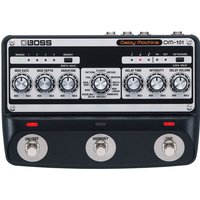
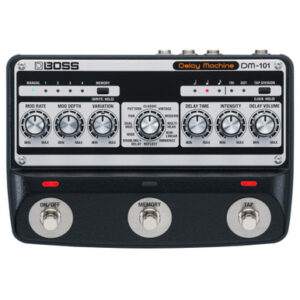
The Boss DM-101 Delay Machine Stereo Analogue Pedal is the ultimate stereo delay experience. It presents the functionality of modern digital delays but combined with the warmth and lushness of vintage stereo analogue. And with a staggering eight individual BBD chips providing that authentic tone youre free to explore an array of inventive sonic character throughout the astonishing 12 unique delay modes. These delay modes range from shimmering ambience to cacophonic echoes and oscillating repeats all designed to unlock your creativity. And with plenty of parameters to explore per each unique delay your options are virtually endless – you can even select carryover to let your repeats fade out naturally after switching off the DM-101. And with typical Boss quality of life features like MIDI integration tap tempo and a programmable memory bank to recall your favourite delays the DM-101 demands a place on your pedalboard!
Boss DM-101 Delay Machine Stereo Analog Delay Pedal
This is a New Boss DM-101 Delay Machine Stereo Analog Delay Pedal from Boss its found in our Delay Pedals on the Just Pedals menu. Read More below.
As an affiliate partner, we may earn a small commission when you buy through our links — at no extra cost to you.
Related videos

Brand
Boss
BOSS began in Osaka in 1973 as MEG Electronics, a company dedicated to effects. Its first BOSS-branded effect was the CE-1 Chorus Ensemble in 1976; the OD-1, SP-1 and PH-1 launched the compact-effects series in 1977. The JustPedals catalogue includes familiar overdrives and distortions such as the OD-3, SD-1, BD-2, DS-1 and MT-2 Metal Zone, as well as utility items such as the PCS-20A cable. BOSS now spans compact pedals, multi-effects, loopers, tuners and controllers. Manufacturing origin should be checked by model rather than inferred from the brand’s Japanese history.
Category
Delay Pedals
Delay records the incoming signal for a chosen interval and repeats it after the original note. Feedback returns repeats to the delay line, while tone, filtering, modulation and saturation determine whether echoes remain clear, darken progressively, wobble like tape or degrade like analogue bucket-brigade circuits. Delay time and rhythmic subdivisions govern the spacing and musical pattern of the repeats.
Tags
Analogue
The signal is shaped by continuously varying electronic circuitry rather than being converted into a digital effect algorithm. Component choice, operating voltage and circuit tolerances influence headroom, noise, clipping texture and the small variations in response between designs.
Digital
Converts the signal or control process into numerical data for algorithmic processing. Digital designs can provide precise timing, long memory, complex routing and repeatable presets; sample rate, conversion, internal resolution and latency influence fidelity and response.
MIDI
Sends, receives or responds to Musical Instrument Digital Interface messages rather than carrying the instrument audio itself. Program changes recall presets, continuous controllers move parameters, and MIDI clock or transport messages synchronise timing between devices.
Stereo
Processes, creates or passes two audio channels. True stereo preserves separate left and right inputs, while mono-to-stereo effects generate spatial differences internally; routing, phase behaviour and whether trails remain stereo determine the resulting image. Some outputs sum to mono when only one socket is connected, which can change level or modulation depth.
Tap Tempo
Measures repeated foot taps and converts their interval into an effect rate or delay time. Subdivisions translate that pulse into dotted, triplet or other rhythmic values, while averaging and range limits influence how quickly and accurately the tempo settles.