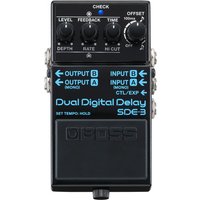
Boss SDE-3 Dual Digital Delay Pedal

£169.00

This is a New Boss SDE-3 Dual Digital Delay Pedal from Boss, listed in Delay Pedals on Just Pedals. Read More below.

View Just
more
and , , ,

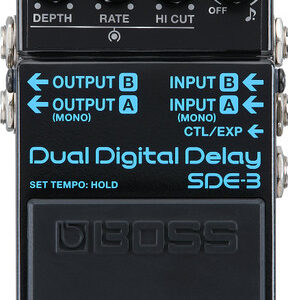
Recreate the legendary delay sounds of the legendary Roland SDE-3000, enhance it with modern controls and even run two delays simultaneously. Not only that, but all of this sonic power is contained in a regular Boss sized pedal for more pedalboard real-estate.

Key Features

  • Authentic Recreation – Unique BOSS circuitry authentically recreates legendary 1980s Roland SDE-3000 Digital Delay effects
  • Immersive Stereo Sound – Create immersive stereo effects using Offset to fine-tune the relative time difference between dual delays
  • Choose Your Mode – Advanced stereo operation with independent channel and panning modes.
  • Wet Or Dry Signal? – Specify wet/dry signal configuration of both outputs
  • Intuitive Controls – Explore SDE-3000-style modulation with dedicated Depth and Rate knobs. Add warmth and character to delay repeats using Hi Cut filter.
  • Tap Tempo – Access tap tempo function with onboard switch
  • Connect A Footswitch – Connect external footswitch for expanded real-time control
  • MIDI – MIDI In jack provides MIDI clock tempo synchronization
  • Huge Delay Time – Maximum delay time of 1,600ms

Recreating a Legend

Introduced in 1983 by Roland, the SDE-3000 is revered for its beautifully rich sound and distinctive modulation. The SDE-3 brings the authentic vibe of this classic delay to a pedalboard-friendly BOSS compact, enhanced with innovative creative features for every musical style.

Vintage Colour & Character

Elevate your tone with a whole host of evocative vintage delay sounds. The efficient panel provides the primary controls of the vintage SDE-3000 which includes the delay time, feedback, and independent rate and depth knobs for the modulation.

In addition, some more controls have been added to expand your sonic potential. Explore retro single delays and ’80s-style mod/delay combos. Or tweak the mod and high-cut controls to conjure moody, atmospheric tonalities for ambient, chill, and lo-fi music – the only limit is your creativity.

Offset Magic

Not only does this pedal contain the legendary SDE-3000’s famous mono sound, but the SDE-3 includes a powerful Offset feature to create interesting tones with two simultaneous delays.

Yes, two different delays at once.

With one simple control, you can instantly add a second delay to the primary delay for a wealth of mono and stereo colours to create your own atmosphere.

Doubled Delays

Turning the Offset knob up to its center position introduces a second delay that’s 1–100 ms longer than the primary delay.

Timed Dual Delays

In the second half of its range, the Offset knob produces a shorter second delay that’s based on the primary delay time. Use the pedal’s tap tempo function to determine the quarter-note value for the primary delay.

Multiple Output Modes

The versatile SDE-3 provides output configurations for any stage or studio scenario. Run it in mono for basic setups.

Play in true stereo with discrete left/right delays or a panning mode for ultra-wide sounds that move across the stereo field. Send dry and direct feeds to two amps for wet/dry setups.

Modern Workflow

Enhance your performances with the modern control that the SDE-3 offers. Press and hold the pedal switch to enable the tap tempo function. Or use the TRS MIDI input to receive clock sync signals from DAWs, pedals, and drum machines.

Focused High-Definition Audio

AF method (Adaptive Focus method) This is a proprietary method from Roland & BOSS that vastly improves the signal-to-noise (SN) ratio of the AD and DA converters.

Highly Compatible

Connect external footswitches for on-demand access to tap tempo and a hold function for on-the-fly looping. Alternately, an expression pedal can be used to control the Level, Feedback, and Time knobs for delay mix adjustment, wild pitch effects, and dramatic self-oscillation.

Here is a selection of compatible products:

Controls

  • TIME Knob
  • FEEDBACK Knob
  • LEVEL Knob
  • DEPTH Knob
  • RATE Knob
  • HI CUT Knob
  • OFFSET Knob
  • Pedal Switch
  • CARRYOVER Switch

Specifications

  • Sample Rate: 48 KHZ
  • AD Conversion: 24 Bits + AF Method
  • DA Conversion: 32 Bits
  • Nominal Input Level: INPUT A (MONO), INPUT B: -20 DBU
  • Maximum Input Level: INPUT A (MONO), INPUT B: +7 DBU
  • Input Impedance: INPUT A (MONO), INPUT B: 1 MΩ
  • Nominal Output Level: OUTPUT A (MONO), OUTPUT B: -20 DBU
  • Maximum Output Level: OUTPUT A (MONO), OUTPUT B: +7 DBU
  • Output Impedance: OUTPUT A (MONO), OUTPUT B: 1 Kω
  • Recommended Load Impedance: OUTPUT A (MONO), OUTPUT B: 10 Kω Or Greater
  • Bypass: Buffered Bypass
  • Indicator: CHECK indicator (Used for indication of Tempo and check battery)

Connectors

  • INPUT A (MONO) jack, INPUT B jack, OUTPUT A (MONO) jack, OUTPUT B jack: 1/4-inch phone type
  • CTL/EXP jack: 1/4-inch TRS phone type
  • DC IN jack
  • MIDI IN jack: Stereo miniature phone type

Power Supply

  • Battery Powered: Yes
  • AC adaptor: PSA Series: Sold Separately
  • Current Draw: 75 mA
  • Expected Battery Life Under Continuous Use: Alkaline Battery: Approx. 4.5 Hours

Dimensions

  • 73 (W) x 129 (D) x 59 (H) mm
  • 2-7/8 (W) x 5-1/8 (D) x 2-3/8 (H) Inches

Weight (Including Battery)

  • 450 g / 1 lbs

* 0 dBu = 0.775 Vrms

Related videos

Brand

Boss

In the current JustPedals catalogue, Boss is represented by Multi-Effects Pedals, Delay Pedals and Distortion Pedals. Current listings include PW-3 Wah, PX-1 Plugout FX and FZ-5 Fuzz. That makes the range relevant to players looking for drive, gain and clipping, plus time-based effects and ambience. Check each model for its exact circuit or processing platform, controls, power requirements and connections, particularly where the catalogue includes both pedals and supporting gear.

Category

Delay Pedals

Delay pedals repeat the input after a set time, from a short slapback to long ambient trails. Feedback controls how many repeats continue; filtering, modulation, saturation and mix shape their tone and prominence. Tap tempo can keep rhythmic delays aligned with a song, while presets and MIDI help when several timings are needed. Analogue, tape-style and digital designs respond differently to transients and overload. Check maximum delay time, spillover, stereo routing, trails and headroom before choosing a model for the rest of the board.

Tags

Digital

Digital products use conversion and processing to create, store or control the effect. This can provide presets, complex routing, repeatable algorithms, USB, MIDI and firmware features, but conversion, latency, power requirements and clocking depend on the design. Check the input and output levels, sample or impulse-response support, bypass behaviour and current draw when combining a digital unit with analogue pedals or a direct recording setup.

MIDI

MIDI sends, receives or responds to Musical Instrument Digital Interface messages rather than carrying instrument audio itself. Program changes can recall presets, continuous controllers can move parameters and MIDI clock or transport messages can synchronise timing. Check the connector or USB method, channel and message support, clock direction, latency and whether the device needs a separate MIDI host or adapter. MIDI control is powerful, but compatibility depends on the exact messages each product understands.

Stereo

Stereo products provide separate left and right audio paths, which may widen modulation, preserve independent delays or route a pedalboard into two amplifiers or a mixer. Input and output behaviour is not always symmetrical: some units sum a stereo input, while others create stereo from a mono source. Check whether the effect collapses safely to mono, how the dry signal is routed, the socket format and the destination’s panning and phase requirements.

Tap Tempo

Tap tempo lets a player set delay, modulation, tremolo or looper timing by tapping a footswitch. The implementation may be a dedicated switch, an external input, MIDI clock or a combination, and the supported timing divisions vary. Check whether the tempo is stored, whether tap is momentary or latching, how quickly the effect follows changes and which blocks respond. Tap tempo is useful only when the control connection and timing range match the workflow.